1. 기본값: 340px
/* 사이드바 반응형 수정 코드 시작 */
:root {
  --sidebar-width: 280px;
}

#header .menu {
  position: fixed;
  top: 0;
  left: calc(-1 * var(--sidebar-width));
  z-index: 400;
  width: var(--sidebar-width);
  height: 100vh;
  padding: 94px 20px 189px 40px;
  background-color: #fff;
  box-sizing: border-box;
  transition: left .5s ease-in-out;
}

#header .menu.on {
  left: 0;
}
/* 사이드바 반응형 수정 코드 끝 */
2. 노트북: 340px
/* 큰 화면에서만 사이드바 항상 표시 */
@media (min-width: 1580px) {
  #header .menu {
    left: 0;
  }

  #header .menu.on {
    left: calc(-1 * var(--sidebar-width));
  }
}

/* 작은 노트북/태블릿에서는 사이드바를 조금 더 좁게 */
@media screen and (max-width: 1399px) {
  :root {
    --sidebar-width: 340px;
  }
}
3. 모바일: 280px
@media screen and (max-width:767px) {
  :root {
    --sidebar-width: 280px;
  }

  #header .mobile-menu {
    top: 10px;
    left: 11px;
  }

  #header .menu {
    padding: 84px 20px 189px;
  }
추가로, 사이드바는 큰 화면(default 즉 340px)에서만 오른쪽으로 펼쳐지도록 함. 그 외는 직접 펼쳐야 함.
변경 이유: 큰 화면에서는 사이드바가 너무 작고, 노트북에서는 사이드바가 너무 커서 글 내용을 침범함
-> 그냥 노트북도 크게 나오게 함. 글자 너무 뭉개진다.
4. 방문자수 넣기
poster 테마엔 사이드바가 기본적으론 없어서, 그냥 html 하드코딩하기로 결정
<div class="text-profile">
Robotics / AI / Computer Vision<br>
...
<a href="https://github.com/cuffyluv" target="_blank" rel="noopener noreferrer">Github</a>
</div>
</div>
요거 아래에
			<!-- 방문자수 추가 시작 -->
            <div class="sidebar-counter">
              <div class="counter-title">Visitors</div>
              <div class="counter-row">
                <span>Total</span>
                <strong></strong>
              </div>
              <div class="counter-row">
                <span>Today</span>
                <strong></strong>
              </div>
              <div class="counter-row">
                <span>Yesterday</span>
                <strong></strong>
              </div>
            </div>
            <!-- 방문자수 추가 끝 -->
요거 추가
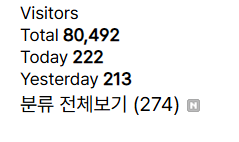
5. 방문자수 css 꾸미기
/* 방문자수 박스 추가 시작 */
#header .menu .sidebar-counter {
  width: calc(100% - 40px);
  margin: 0 0 28px 0;
  padding: 16px 18px;
  box-sizing: border-box;
  border-top: 1px solid rgba(123, 63, 0, 0.35);
  border-bottom: 1px solid rgba(123, 63, 0, 0.35);
  color: rgb(123, 63, 0);
  font-size: 14px;
}

#header .menu .sidebar-counter .counter-title {
  margin-bottom: 12px;
  font-weight: 700;
  text-align: center;
  letter-spacing: 0.03em;
}

#header .menu .sidebar-counter .counter-row {
  display: flex;
  justify-content: space-between;
  align-items: center;
  line-height: 1.8;
}

#header .menu .sidebar-counter .counter-row span {
  opacity: 0.75;
}

#header .menu .sidebar-counter .counter-row strong {
  font-weight: 700;
}
/* 방문자수 박스 추가 끝 */
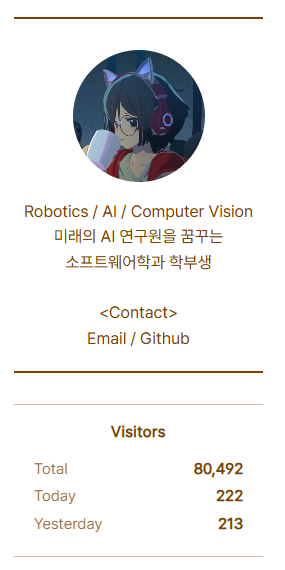
6. 프로필, 방문자수 margin 좀 좁혀서 컴팩트하게 바꾸기
/* 프로필수정 */
#header .menu .box-profile {
  position: relative;
  margin: 10px 0 12px 0;
  width: calc(100% - 40px);
  box-sizing: border-box;
  border-top: 2px solid rgb(123,63,0);
  border-bottom: 2px solid rgb(123,63,0);
  text-align: center;
  background-color: rgba(255, 255, 255, 0.432);
}
/* 방문자수 박스 추가 시작 */
#header .menu .sidebar-counter {
width: calc(100% - 40px);
margin: 0 0 12px 0;
padding: 16px 18px;
box-sizing: border-box;
border-top: 1px solid rgba(123, 63, 0, 0.35);
border-bottom: 1px solid rgba(123, 63, 0, 0.35);
color: rgb(123, 63, 0);
font-size: 14px;
}
만족스럽당
7. 프로필 페이지 작성

                <a href="https://cuffyluv.tistory.com/pages/profile">Profile</a>
                <span>/</span>
                <a href="https://github.com/cuffyluv" target="_blank" rel="noopener noreferrer">Github</a>
8. powered by tistory 지우기 + 아래쪽으로 extend하기
<!-- <p>POWERED BY TISTORY</p> -->#header .menu {
position: fixed;
top: 0;
left: calc(-1 * var(--sidebar-width));
z-index: 400;
width: var(--sidebar-width);
height: 100vh;
padding: 94px 20px 24px 40px;
background-color: #fff;
box-sizing: border-box;
transition: left .5s ease-in-out;
}189 -> 32
  #header .menu {
    padding: 84px 20px 28px;
  }
189 -> 28
9. 근데 125% 크롬으로 보니까 노트북에 걸리네 threshold 좀 조절하고 너비 조절
너비 340 -> 320
해상도 threshold 1580px -> 1500px
1399 이하: 340 -> 280px
10. 최종본

'Others > 티스토리 스킨 뚜따 프로젝트' 카테고리의 다른 글
| #7 poster 테마도 사이드 프로필이 가지고 싶어! (0) | 2026.05.24 |
|---|---|
| #5 노션처럼 티스토리에 인라인 수식을 넣어보자!!! (0) | 2025.04.02 |
| #4 bullet point(글머리 기호, 리스트)지만 인라인 코드를 넣고 싶어! (0) | 2025.03.17 |
| #3 인라인 코드 백틱(`) 적용 [티스토리 스킨 뚜따 프로젝트] (0) | 2024.09.12 |
| #2 본문 너비 넓히기 [티스토리 스킨 뚜따 프로젝트] (0) | 2024.08.27 |


